


iCloud helps keep your photos, files, and backups in sync across your Apple devices. Because of how much personal data is stored in one place, it has also become a common target for online scams. Many Mac users report receiving pop-ups, emails, or messages claiming their iCloud storage is full or that their account has […]
Category Archives: Computer Tips
Mission Control on Mac: Key Features and Benefits Simplified
Mission Control is a powerful built-in feature on Mac and MacBook devices that gives you a clear overview of everything currently open on your screen. Instead of juggling overlapping windows, you can instantly see all apps, desktops, and full-screen programs in one organised view. If you regularly multitask for work, study, or business, learning how […]
Your MacBook Pro Keyboard Acting Up: Here’s What Might Be Going Wrong
If your MacBook Pro keyboard isn’t working the way it should, you’re far from alone. Keyboard problems are one of the more common issues MacBook users encounter, ranging from keys that stop responding to repeated characters appearing with a single press. These faults can slow you down quickly, especially if your MacBook Pro is central […]
Why Does My MacBook Shut Down Unexpectedly Without A Charger?
Facing unexpected shutdowns on your MacBook can be frustrating and disruptive, especially when you’re in the middle of important tasks. Whether you’re working on a presentation, writing an email, or browsing the web, the sudden loss of power can affect your productivity and even lead to lost data. This issue is common and can stem […]
Where To Go For MacBook M1 A2337 Screen Replacement in Auckland
When your MacBook M1 A2337 screen breaks, finding a reliable repair is crucial for a seamless fix. Many users face common issues with M1 MacBook screens, such as cracks, pixel distortion, or touch sensitivity problems. Attempting DIY repairs may seem like a quick fix, but it often carries risks that can worsen the damage or […]
The Top 5 Mac Repair Issues in Auckland and How to Solve Them
If you use a Mac for study, business, or everyday life in Auckland, reliability matters. While Apple devices are known for solid build quality, no machine is immune to wear, accidental damage, or software faults. At Advanced Computers, we repair Apple devices daily from our Rosedale (North Shore) and Penrose workshops. Based on years of […]

5 Ways to Protect Your iPhone
At Advanced Computers, we repair iPhones every day at our North Shore and Penrose branches. Cracked screens, liquid damage, battery issues and charging faults are some of the most common problems we see. While accidents can happen to anyone, many repairs are preventable with a few simple precautions. Here are five practical ways to protect […]

Why Is My MacBook Overheating? Causes, Fixes & When to Get Help in Auckland
If your MacBook feels hot enough to warm your hands on a chilly Auckland morning, you’re not imagining it. Overheating is one of the most common issues we see, especially during those humid summer days when even sitting still feels warm. Maybe the fan sounds like it’s preparing for takeoff from Auckland Airport. Maybe your […]
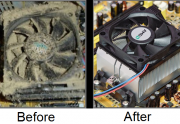
Winter Computer Cleaning Tips to Prevent Overheating and Fan Damage
Winter in Auckland means closed windows, heaters running and less natural airflow through homes and offices. While it might not feel extreme, these seasonal changes can have a noticeable impact on your computer’s cooling system. At Advanced Computers, we see a clear increase in overheating issues, loud fans and airflow blockages during winter. In most […]

4 Super Simple iOS Maintenance Tips for iPhone & iPad
Keeping your iPhone or iPad running smoothly doesn’t have to be complicated. Even the latest Apple devices can slow down over time if they aren’t properly maintained. At Advanced Computers, our Apple-certified technicians in Auckland see hundreds of devices every year with simple issues that could have been prevented with the right habits. Here are […]