


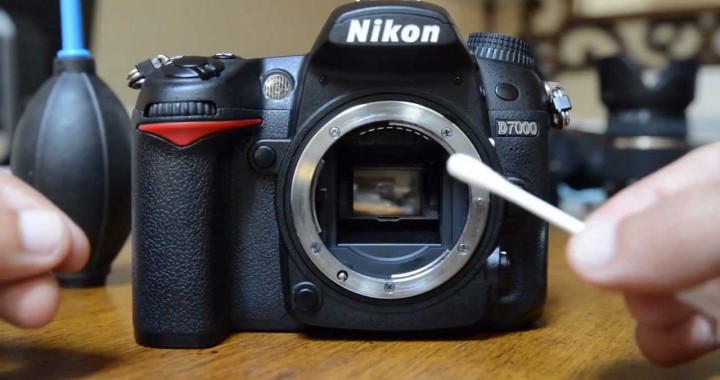
DSLR and mirrorless cameras are a serious investment, whether you’re a photography enthusiast or rely on your gear for professional work. In Auckland’s environment — with coastal air, humidity, and fine dust — cameras can accumulate grime faster than many owners expect.
At Advanced Computers, we regularly service cameras affected by dust on sensors, sticky buttons, and internal contamination that gradually impacts image quality. Proper cleaning and maintenance keep your camera performing reliably and help avoid costly repairs.
1. Safe At-Home DSLR Maintenance
Some routine care can be done safely at home and should be part of every photographer’s workflow.
Cleaning the Camera Body
-
Use a soft microfibre cloth to wipe down the body
-
Remove fingerprints, dust, and surface grime
-
Avoid household cleaners or alcohol on rubber grips or seals
Cleaning the Lens (External Only)
-
Start with a rubber blower to remove loose dust
-
Use a small amount of lens-cleaning solution on a lint-free cloth
-
Gently wipe in circular motions
-
Never spray liquid directly onto the lens
Important:
Do not use compressed air cans — they can force moisture and propellant into the lens or camera body.
Doing this basic maintenance before or after shoots helps maintain image clarity and extends the life of your equipment.
2. What You Should NOT Clean at Home
Some parts of a DSLR or mirrorless camera are extremely sensitive and should not be touched without proper tools and training.
Avoid DIY cleaning of:
-
Image sensors
-
Internal mirrors or shutters
-
Viewfinder internals
-
Internal lens elements
We frequently see cameras brought into our Auckland branches after well-intentioned home cleaning has caused:
-
Scratched sensors
-
Damaged shutter mechanisms
-
Dislodged internal components
These issues are far more expensive to fix than professional cleaning.
3. Signs Your Camera Needs Professional Cleaning
It’s time to seek professional servicing if you notice:
-
Dark spots appearing in the same place on multiple photos
-
Reduced sharpness despite clean lenses
-
Sticky buttons or dials
-
Unusual noises during shooting
-
A camera that has been unused for a long period
Sensor dust is particularly common and cannot be safely resolved with basic tools.
4. Professional DSLR & Mirrorless Camera Cleaning in Auckland
At Advanced Computers, our technicians provide specialised camera cleaning and servicing for both hobbyists and professionals.
Our services include:
-
Safe sensor cleaning using approved methods
-
Internal body cleaning to remove dust and debris
-
Inspection of shutters, mirrors, and mounts
-
Lens and accessory checks
-
Advice on correct storage and maintenance routines
We work with all major brands, including Canon, Nikon, Sony, and Fujifilm, and handle equipment with the care required for precision devices.
5. How to Reduce Dust and Damage Between Services
Good habits significantly reduce the need for frequent professional cleaning.
We recommend:
-
Store cameras in a clean, dry camera bag or case
-
Use lens caps and body caps at all times
-
Avoid changing lenses outdoors in windy or dusty conditions
-
Point the camera mount downwards when changing lenses
-
Perform basic external cleaning regularly
These steps are especially important for Auckland photographers who shoot outdoors or near coastal areas.
DSLR & Camera Servicing in Auckland
If your camera needs cleaning, inspection, or repair, Advanced Computers is here to help. Our Auckland branches are open 6 days a week and provide reliable, professional camera repairs.
📍 North Shore:
7C Triton Drive, Rosedale, Auckland | +64 9 444 8823
📍 Penrose:
67 Station Road, Penrose, Auckland | +64 9 525 0240
Whether your camera is due for routine cleaning or showing signs of a deeper issue, our technicians can assess it safely and help keep it performing at its best.