


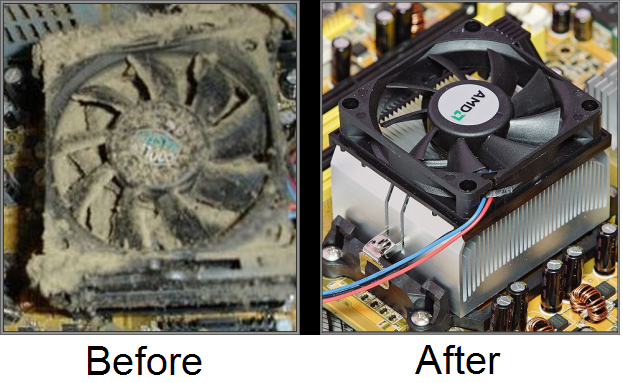
Winter in Auckland means closed windows, heaters running and less natural airflow through homes and offices. While it might not feel extreme, these seasonal changes can have a noticeable impact on your computer’s cooling system. At Advanced Computers, we see a clear increase in overheating issues, loud fans and airflow blockages during winter. In most cases, the root cause is simple: dust build-up inside the machine.
If your PC or laptop is running louder than usual, feeling hot, or slowing down, winter cleaning may be overdue.
Why Winter Causes More Dust Problems
During Auckland winters:
-
Windows stay closed for longer periods
-
Indoor air circulates repeatedly
-
Heaters move dust around rooms
-
Ventilation is reduced
Your computer constantly pulls air in to cool internal components. That air carries dust particles. Over time, those particles collect inside the machine — especially around:
-
Cooling fans
-
Heatsinks
-
Air vents
-
Power supplies
-
Graphics cards
Once airflow becomes restricted, temperatures rise.
What Happens When Dust Blocks Airflow
Modern computers automatically increase fan speed when temperatures climb. That’s often the first sign something isn’t right. If internal dust is not removed, it can lead to:
-
Constant loud fan noise
-
Reduced performance (thermal throttling)
-
Unexpected shutdowns
-
System instability
-
Shortened component lifespan
In more serious cases, overheating can permanently damage the motherboard or graphics card. We frequently open systems in winter and find cooling systems heavily clogged — particularly in desktops placed on carpeted floors or in office environments with steady foot traffic.
Signs Your Computer Needs a Winter Clean
If you’re in Auckland and notice any of the following, your system may need internal servicing:
-
Fans running loudly even during light use
-
The computer feels hot to touch
-
Performance drops when multitasking
-
Games or software suddenly lag
-
The machine shuts down without warning
-
You can see visible dust around vents
These symptoms usually worsen over time.
How Often Should You Clean Your Computer?
For most home users, a professional internal clean every 6–12 months is sufficient. However, in Auckland conditions — particularly during winter — we recommend cleaning every three months if:
-
You use the computer daily
-
It’s a gaming or high-performance system
-
It’s located in a business environment
-
There are pets indoors
-
It sits on carpet
Regular cleaning extends the life of your hardware and helps maintain consistent performance.
Why DIY Cleaning Can Go Wrong
Many people attempt to clean their computer using compressed air. While this can remove surface dust, it does not properly clear compacted build-up inside heatsinks or power supplies.
Common DIY risks include:
-
Spinning fans too fast and damaging bearings
-
Dislodging cables
-
Causing static discharge damage
-
Blowing dust deeper into the system
Professional servicing ensures the machine is safely opened, properly cleaned and reassembled without risk to internal components.
At Advanced Computers, our winter cleaning service is designed to restore proper airflow and reduce overheating risk. A standard internal clean includes:
-
Full case opening
-
Safe dust removal
-
Fan and heatsink cleaning
-
Airflow pathway clearing
-
Visual inspection of components
-
Basic temperature check
If we identify early signs of wear — such as failing fans or degraded thermal paste — we’ll explain your options clearly before proceeding. This service is available at both our Auckland branches and most cleaning services are completed within one hour when booked specifically as a cleaning service.
Why Overheating Shouldn’t Be Ignored
Many customers assume loud fans are “normal”. In reality, they are often warning signs. Persistent overheating can:
-
Reduce processor lifespan
-
Damage graphics cards
-
Corrupt data
-
Cause sudden shutdowns during important work
For businesses in Auckland, this can mean lost productivity and downtime. Preventative cleaning is far more affordable than major component replacement.
Winter Maintenance Tips for Auckland Homes and Offices
To reduce dust build-up during winter:
-
Keep computers off carpet where possible
-
Avoid placing units directly against walls
-
Vacuum around work areas regularly
-
Ensure vents are not blocked
-
Keep pets away from air intakes
If your workspace is particularly dusty, more frequent servicing may be worthwhile.
Cleaning for Gaming and High-Performance Systems
Gaming PCs and workstation machines generate more heat than basic office systems. During winter, restricted airflow becomes even more noticeable. If you experience:
-
Frame rate drops
-
System throttling
-
GPU overheating warnings
An internal clean should be one of the first steps before assuming hardware failure. We regularly service high-performance systems for customers across Auckland and can quickly determine whether cleaning alone will resolve the issue.
Trusted Computer Repairs in Auckland
Advanced Computers supports both home users and businesses across Auckland. We are a full-service repair and technology provider — not just a retail shop. Customers choose us because we offer:
-
Experienced local technicians
-
Clear repair explanations
-
Realistic timeframes
-
Transparent pricing
-
Practical, honest advice
We understand how Auckland’s seasonal conditions affect computer systems because we repair them every day.
When to Book a Winter Clean
Consider booking a professional clean if:
-
Your system hasn’t been serviced in over a year
-
It sounds louder than it used to
-
It runs hot during normal tasks
-
You rely on it for business or study
-
You want preventative maintenance before problems arise
Winter is the ideal time to service your machine before overheating leads to hardware failure.
Book Your Winter Computer Cleaning in Auckland
If your computer is running hot, loud or slower than usual, don’t wait for it to fail. Our team at Advanced Computers can restore proper airflow and reduce the risk of overheating with a professional internal clean. You can book online or visit our Penrose or North Shore branches for assistance. If you’re unsure whether your computer needs servicing, contact us and we’ll provide straightforward advice. Preventative maintenance is always cheaper than emergency repair.